

Table of Contents
Having a versatile and powerful device is essential for both work and leisure. ASUS, a renowned name in the technology industry, has once again delivered a groundbreaking innovation with the ASUS 2-in-1 Q535. This sleek and powerful convertible laptop offers the perfect blend of performance, functionality, and versatility, making it an ideal choice for professionals, creatives, and tech enthusiasts alike. In this blog post, we will explore the impressive features and benefits of the ASUS 2-in-1 Q535 and discover why it stands out among the competition.
Design and Display
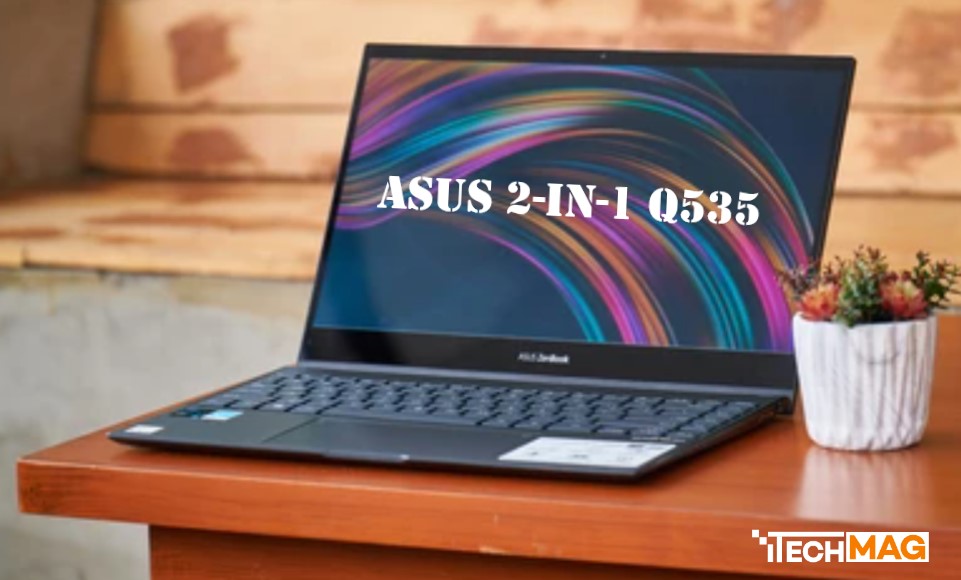
The ASUS 2-in-1 Q535 boasts an elegant and sleek design that exudes professionalism and sophistication. Its aluminum chassis not only adds durability but also gives it a premium look and feel. The 15.6-inch touchscreen display with 4K UHD resolution delivers stunning visuals with vibrant colors, sharp details, and wide viewing angles, making it perfect for content creation, multimedia consumption, and productivity tasks.
Versatility and Flexibility
One of the standout features of the ASUS 2 in-1 Q535 is its ability to transform effortlessly from a laptop to a tablet and everything in between. The 360-degree hinge allows you to switch between various modes, such as laptop mode for typing, tent mode for presentations, stand mode for watching movies, and tablet mode for touch-based interactions. This versatility ensures that you can adapt the device to your specific needs and work or play in any situation.
Performance and Power
Under the hood, the ASUS 2 in-1 Q535 packs a punch with its impressive hardware configuration. It is powered by the latest Intel Core i7 processor, ensuring snappy performance and efficient multitasking capabilities. With up to 16GB of RAM and a fast SSD storage option, you can expect quick boot times, smooth application launches, and seamless data transfer. The device also features dedicated graphics, such as the NVIDIA GeForce GTX 1650, which delivers excellent visuals and enables you to tackle demanding tasks like video editing and gaming.
Read More:
Enhanced User Experience
ASUS has always prioritized user experience, and the ASUS 2-in-1 Q535 is no exception. The backlit keyboard provides a comfortable typing experience, even in low-light environments. The precision touchpad allows for precise cursor control and supports multi-finger gestures for intuitive navigation. Additionally, the device supports an active stylus (sold separately), allowing you to take notes, draw, and sketch with ease, making it an ideal tool for creative professionals.
Connectivity and Portability
The ASUS 2-in-1 Q535 offers a comprehensive range of connectivity options to keep you connected wherever you go. It features USB Type-C, USB 3.2, HDMI, and an SD card reader, allowing you to connect to various peripherals and external displays. The device also supports the latest Wi-Fi 6 technology for faster wireless connectivity. Despite its powerful specifications, the ASUS 2 in-1 Q535 remains portable and lightweight, making it a convenient companion for professionals on the move.
FAQs:
Q: What are the key features of the ASUS 2-in-1 Q535?
A: The ASUS 2 in-1 Q535 offers a range of impressive features, including a sleek aluminum chassis, a 15.6-inch 4K UHD touchscreen display, a 360-degree hinge for versatile usage modes, powerful Intel Core i7 processor, dedicated graphics (NVIDIA GeForce GTX 1650), up to 16GB of RAM, fast SSD storage, backlit keyboard, precision touchpad, support for an active stylus (sold separately), comprehensive connectivity options, and portability.
Q: What makes the ASUS 2-in-1 Q535 versatile?
A: The ASUS 2-in-1 Q535’s versatility lies in its ability to transform seamlessly from a laptop to a tablet and various other modes. The 360-degree hinge allows you to switch between laptop mode for typing, tent mode for presentations, stand mode for watching movies, and tablet mode for touch-based interactions. This versatility ensures that you can adapt the device to your specific needs and work or play in any situation.
Q: What is the performance like on the ASUS 2-in-1 Q535?
A: The ASUS 2 in-1 Q535 delivers impressive performance with its latest Intel Core i7 processor, up to 16GB of RAM, and fast SSD storage. This hardware configuration ensures snappy performance, efficient multitasking capabilities, quick boot times, smooth application launches, and seamless data transfer. The device also features dedicated graphics (NVIDIA GeForce GTX 1650), enabling you to tackle demanding tasks such as video editing and gaming.
Q: Can I use an active stylus with the ASUS 2-in-1 Q535?
A: Yes, the ASUS 2 in-1 Q535 supports an active stylus (sold separately). This allows you to take notes, draw, and sketch with ease, making it an ideal tool for creative professionals who require precise and natural input.
Q: How is the connectivity and portability of the ASUS 2-in-1 Q535?
A: The ASUS 2-in-1 Q535 offers a comprehensive range of connectivity options, including USB Type-C, USB 3.2, HDMI, and an SD card reader. These ports allow you to connect to various peripherals and external displays. The device also supports the latest Wi-Fi 6 technology for faster wireless connectivity. Despite its powerful specifications, the ASUS 2-in-1 Q535 remains portable and lightweight, making it a convenient companion for professionals on the move.
Q: Can the ASUS 2-in-1 Q535 handle gaming and multimedia tasks?
A: Yes, the ASUS 2-in-1 Q535 is equipped with dedicated graphics (NVIDIA GeForce GTX 1650), which enables it to handle gaming and multimedia tasks with ease. The powerful hardware configuration and high-resolution display make it a suitable choice for immersive gaming experiences and enjoying multimedia content in stunning detail.
Q: Is the ASUS 2-in-1 Q535 suitable for professionals?
A: Absolutely! The ASUS 2-in-1 Q535’s powerful performance, versatile form factor, and enhanced user experience make it an excellent choice for professionals. It offers the necessary processing power for demanding tasks, supports an active stylus for note-taking and digital artwork, provides multiple usage modes for flexibility in different work scenarios, and features a portable design that allows professionals to work on the go.
Q: Where can I purchase the ASUS 2-in-1 Q535?
A: The ASUS 2-in-1 Q535 is available for purchase at authorized ASUS retailers, online marketplaces, and the official ASUS website (https://www.asus.com/us/store/).
Conclusion
The ASUS 2-in-1 Q535 is a testament to ASUS’s commitment to innovation and excellence in the tech industry. With its impressive design, versatile form factor, powerful performance, and enhanced user experience, it offers a compelling package for professionals and creatives looking for a device that can seamlessly adapt to their dynamic lifestyles. Whether you need a high-performing laptop for productivity tasks, a portable tablet for media consumption, or a creative canvas for your artistic pursuits, the ASUS 2-in-1 Q535 has you covered.
